Hard: Full App — Web Config, Effects, OTA, Chunked Fetch
The complete stack: a web configuration UI, live palette-driven text (the rainbow ramp), multiple public data sources, an OTA update check, and the chunked-fetch technique that keeps the scroll alive during blocking HTTP.
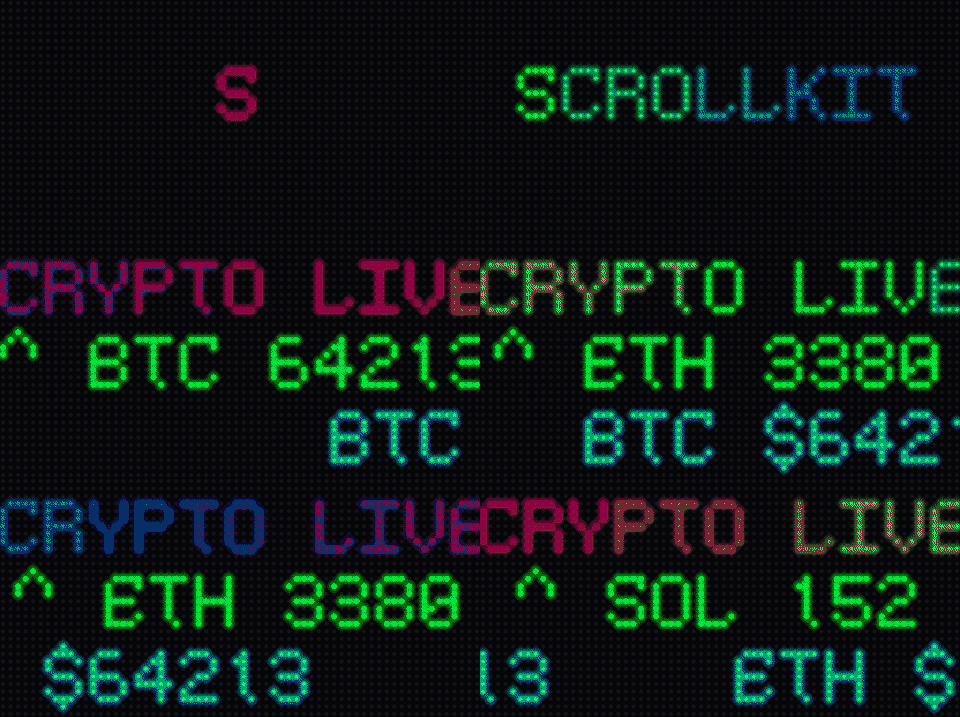
Full source: demos/hard/crypto_dashboard.py
The chunked-fetch workaround
This is the most important pattern for any data-heavy CircuitPython display.
adafruit_requests is synchronous: one request that returns all ten prices
blocks the display loop for the entire transfer, freezing the scroll. Instead,
fetch a few items per request and yield to the event loop between chunks:
COINS = ["bitcoin", "ethereum", "solana", "cardano", "dogecoin",
         "polkadot", "litecoin", "chainlink", "stellar", "monero"]
CHUNK_SIZE = 3  # few items per request -> each blocking call stays short

async def update_data(self):
    prices = {}
    for i in range(0, len(COINS), CHUNK_SIZE):
        chunk = COINS[i:i + CHUNK_SIZE]
        url = ("https://api.coingecko.com/api/v3/simple/price"
               "?ids=" + ",".join(chunk) + "&vs_currencies=usd")
        resp = await self.http.get(url)   # short blocking call (a few items)
        prices.update(resp.json())
        await asyncio.sleep(0)            # (1) let the display render a frame
    ...
- The yield is the whole trick: between each short request the event loop runs, so the display renders a frame and the scroll keeps moving. Slower overall than one big request, but no screen lock-up.
Priority queue
A SYSTEM-priority item sorts ahead of lower-priority items already queued —
ContentQueue is unbounded and never evicts or rejects content; priority (not
insertion order) decides play order among items not yet shown. Adding a
SYSTEM item doesn't preempt whatever is currently playing — the current item
still finishes its own turn first, so give time-sensitive alerts a short
duration if you need them to appear promptly. See
ContentQueue.
from scrollkit.display.content import Priority

self.content_queue.add(StaticText("ScrollKit", x=6, y=12, color=0x00FF88,
                                  duration=2, priority=Priority.SYSTEM))
Web configuration
Constructing the app with enable_web=True starts SettingsWebServer (when
memory allows). Browse to the device's IP to change settings live — backed by
SettingsManager, which persists to JSON across reboots.
OTA at startup
Check GitHub for a new release on boot. Recovery rests on the immutable
boot.py + update system, so a bad update can never disable the updater (see
OTA Updates).
Run it:
PYTHONPATH=src python demos/hard/crypto_dashboard.py
Data source: CoinGecko /simple/price (no API key required).
Animated image intros (the self-driving model)
Everything above drives the screen through the content queue — you add()
items and the framework renders them. The
image animators use the other display
model: a self-driving loop that advances an animation one frame at a time. Reach
for it to open a screen with an animated icon — a rocket lifting off, lights
twinkling across a logo — before the data appears.
An animator decorates an image layer you add yourself, following a
start → step-every-frame → detach contract. Once the image is on screen (the demo
loads it with OnDiskBitmap for the palette + read_indexed_bmp for pixels an
animator can read on-device), the new call is just:
from scrollkit.effects.image_animators import MotionAnimator

animator = MotionAnimator(path="rise", delay=30)          # pick any of the fourteen
animator.start(display, tile, bitmap, palette, base_colors)
for frame in range(animator.HOLD_FRAMES):                 # HOLD_FRAMES = one full play
    animator.step(frame)                                  # advance the motion 1 frame
    if await display.show() is False:                     # composite + present layers
        break
    await asyncio.sleep(0.05)                             # ~20 fps, the display cadence
animator.detach()                                         # settle to rest + free overlays
Because you call step() + show() yourself, this runs in setup() directly
instead of returning to let the queue drive frames — the same shape as the splash
demos. Full runnable version, three intros handing off to data screens:
demos/medium/image_intro.py.
See Image animators for all fourteen and their
feasibility budgets.